What Are Internal Links? Complete Guide to Internal Linking

A strong website needs useful content and a clear structure. Internal links connect related pages, help visitors find useful information, and make a website easier to navigate. So, what are internal links? Internal links are hyperlinks that connect one page of a website to another page on the same domain. They help users discover related content and move between pages without searching for each page separately. Internal linking is the process of adding these connections throughout a website. A well-planned internal linking strategy also helps search engines discover pages and understand how content relates to other pages on the site. Internal links can guide visitors to important resources, explain related topics, and create a clearer website structure. When used naturally, they support both user experience and SEO. What Is an Internal Link? An internal link takes a visitor from one web page to another page on the same website. Imagine you publish a blog post about SEO. Inside the post, you mention keyword research and link to your keyword research guide. Because both pages belong to your website, that connection is internal. You can use these links between: They create useful paths between different pages on your site. Example of an Internal Link Suppose your website has an article called “What Is SEO?” Inside it, you write: Learn more in our complete keyword research guide. If the words “keyword research guide” lead to another article on your domain, you have created an internal connection. Ecommerce stores use the same idea. For example: Homepage → Shoes → Running Shoes → Product Page This path guides shoppers through the store. It improves user navigation and makes products easier to find. An internal link can use descriptive anchor text to explain what readers will find on the destination page. For example, linking the words “keyword research guide” to a relevant guide tells visitors what to expect before they click. This is more useful than using vague text such as “click here.” Why Are Internal Links Important for SEO? Internal link SEO is useful for both visitors and search engines. A clear linking system can improve content discovery, navigation, and the overall organization of your website. Help Search Engines Find Pages Search engine crawlers follow links to discover content. When a crawler reaches one page, it can follow links to other relevant URLs. A clear internal link structure can therefore help search engines crawl and index your content. Pages with no internal links pointing to them are called orphan pages. Search engines may still discover these pages through XML sitemaps or external links, but adding relevant internal links can make them easier for visitors to find. Explain Content Relationships Links also show how different topics connect. For example, a main SEO guide could lead visitors to pages about: This creates a logical link structure. It can make the website easier for users and search engines to understand. Improve Website Navigation Visitors often want more information after reading part of an article. Someone reading about SEO may want to understand backlinks. A relevant link can take that person directly to your backlink guide. This can keep users engaged and improve their experience. Support Important Pages Not every page has the same importance. You may have an important service, category, guide, or commercial page. A relevant link from a high authority page can provide another path to that content. Focus on connecting useful and relevant pages rather than adding links everywhere. A good internal linking strategy prioritizes relevance and usefulness. Link to pages that provide additional information, answer related questions, or help visitors take the next step. Avoid adding links just to increase their number, and use descriptive anchor text so readers understand where each link leads. What Are HTML Internal Links? HTML internal links are usually created with the <a> element. For example: The href contains the destination. “Learn about keyword research” is the anchor text. You can also use a complete URL: If the destination belongs to the same website, it remains an internal connection. When creating HTML internal links, use a meaningful destination and descriptive anchor text. Avoid empty links or vague text that does not explain the destination. For important links, make sure the destination URL works and the page is accessible to visitors. Internal vs External Links The main difference is the destination. Links within your website take visitors to another page on your domain. External links send them to another website. For example: Internal:example.com/seo/ → example.com/keyword-research/ External:example.com/seo/ → anotherwebsite.com/guide/ In simple terms, internal connections stay on your domain, while external links point to other domains. Both internal and external links can be useful. The first type supports navigation and content organization. External connections can send readers to useful third-party research, tools, or references. For example, linking from one blog post to another relevant article on the same website is an internal link. Linking to an official guide or research published on a different website is an external link. Choose either type based on what best helps the reader. What Is Anchor Text? Anchor text is the clickable wording used for a hyperlink. For example: Read our technical SEO guide for more information. “Technical SEO guide” is the clickable phrase. Good descriptive anchor text tells readers what they can expect after clicking. Compare these examples: Weak: Click here Better: Learn how technical SEO works The second version provides useful context. Keep your anchor wording natural. Avoid repeating the same keyword every time you create a link. When choosing anchor text for internal links, describe the destination page accurately. For example, if you link to an article about keyword research, use wording such as “keyword research guide” instead of unrelated keywords. This helps readers understand the link and keeps your website’s internal linking natural. Different Types of Links Within a Website Links can appear in many areas of a site. Each type serves a different purpose. Contextual Links Contextual links appear naturally within the main body of an article. For example,
What Are Outbound Links? A Complete Guide to External Links

Links connect pages across the internet. They help people move from one resource to another. They also help search engines understand how pages and websites are connected. But not every link works in the same way. Some links connect pages within your own website. Others send visitors to another website. These are known as outbound links. So, what are outbound links, and why do they matter for SEO? Outbound links are links from your website to another domain. They can support your content, provide useful sources, and improve the reader’s experience. When used correctly, external linking can also become a useful part of your overall SEO strategy. What Are Outbound Links? Outbound links are hyperlinks that send users from your website to a different website. They are also commonly called external links. For example, imagine you publish a guide about SEO. You mention an official Google resource and link to it. That link takes visitors away from your domain and to Google’s website. That is an outbound link. The simple outbound link meaning is A link that points from your website to another website. Outbound links can point to: A good outbound link should have a clear purpose. It should help the reader learn more or verify information. Why Are Outbound Links Important? Outbound links can make a web page more useful. Suppose you mention a study in one of your blog posts. Instead of only mentioning the study, you can link to the original research. This gives readers direct access to the source. It can also help users and search engines understand the context of your content. They Support Your Claims. Good content often includes facts, research, or statistics. Linking to an authoritative source gives readers a way to check the information. For example, a health article may link to an official medical organization. An SEO article may link to official search engine documentation. They Give Readers More Information You cannot explain every related topic in one article. External links let readers continue learning without making your article unnecessarily long. They Improve Content Quality Useful references can make an article more complete. However, adding random links does not automatically make content better. The destination should be relevant to the topic. Outbound Links vs. External Links People often use outbound links and external links to mean the same thing. An external link connects two different domains. When that link leaves your website, it is an outbound link from your point of view. For example: Website A → Website B For Website A, this is an outbound link. For Website B, it is an inbound link. Therefore, the direction matters. Inbound vs. Outbound Links Inbound links work in the opposite direction. An inbound link comes from another website and points to your website. These incoming links are commonly called backlinks. For example: If an authoritative site links to your guide, you receive a backlink. If you link from your guide to that site, you create an outbound link. Backlinks are an important part of link building because relevant links from other websites can help search engines discover your content and understand its relationships across the web. In simple terms: Inbound link: Another website → Your website Outbound link: Your website → Another website Outbound Links vs. Internal Links Internal links stay on the same website. For example, suppose you publish an SEO guide. Inside that guide, you link to your keyword research article. Both pages are on your domain. That is an internal link. Internal linking supports website navigation and helps visitors discover other useful content. It can also help search engines understand the relationship between pages on your site. For example, your products page may link to related categories. A blog article may link to another page on your site. Outbound links are different because they send visitors to another domain. Both types have a place in a good SEO strategy. What Are the Four Types of Links? There are many ways to classify SEO links, but four common types are These categories can overlap. For example, a link from your website to another domain is both an external link and an outbound link. For the receiving website, that same link becomes an inbound link or backlink. Do Outbound Links Help SEO? Outbound links can support good content, but simply adding more external links will not guarantee that your page gets ranked higher. Quality matters more than quantity. A useful external link should be: For example, linking to original research can help readers understand where your information came from. Relevant links can also add topical relevance and context to your article. The goal should not be to add links only because you think they will improve rankings. Instead, add them when they improve the page. How Search Engines Understand Links Links help connect information across the web. Search engines like Google can crawl links to discover pages and understand relationships between content. Good internal and external linking can therefore help search engines understand how information is connected. However, links are only one part of SEO. Content quality, search intent, technical SEO, page experience, and many other factors also matter. A strong linking structure should support useful content rather than replace it. How to Use Anchor Text Correctly Anchor text is the clickable text used for a link. For example: “Read our complete SEO guide.” The words used for the link are its anchor text. Good descriptive anchor text helps readers understand what they will find after clicking. Compare these examples: Weak: Click here. Better: Read our technical SEO guide. The second example provides more context. Avoid forcing keywords into every link. Anchor text should sound natural within the sentence. What Are Contextual Links? Contextual links are links placed naturally within the main content of a page. For example: An article about backlinks may mention keyword research and link naturally to a keyword research guide. That is a contextual link. Contextual links can be internal or external. They are useful
Guest Posting vs Link Insertion: What’s the Difference?
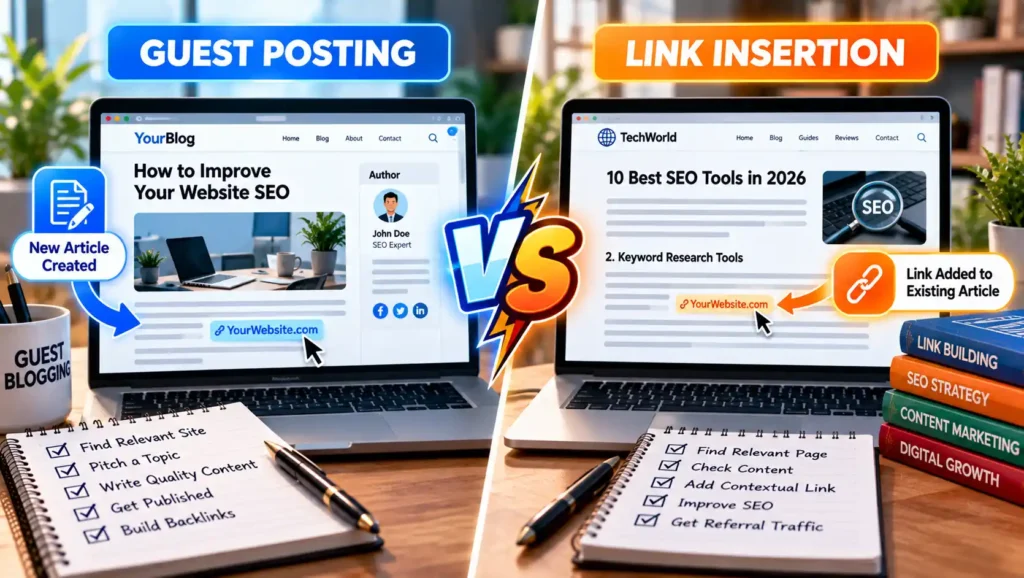
Link building is an important part of SEO. It can help search engines understand how websites and pages are connected. It can also help people discover useful content on other websites. There are many ways to build links. Two common methods are guest posting and link insertion. These methods may look similar because both can place a backlink on another website. However, they work in different ways. With guest posting, you create a new article for another website. With link insertion, a link is added to an existing article. This guide explains guest posting vs. link insertion in simple terms. You will learn how each method works, their main differences, benefits, costs, risks, and how to choose the right option for your SEO strategy. What Is Guest Posting? Guest posting means writing a new article for another website. It is also known as guest blogging. For example, imagine you own an SEO agency. You find a marketing website that accepts guest articles. You suggest a topic about keyword research. The website approves your idea. You then write the article and send it to the editor. If the article meets the site’s rules, the publisher posts it on the website. The article may also include a relevant link to your website. This depends on the publisher’s rules. Guest posting can help you: The key point is simple: guest posting requires new content. You are not just asking for a link. You are giving the publisher a complete article that should be useful to its readers. How Does Guest Posting Work? Guest posting usually involves several steps. 1. Find Relevant Websites Start by finding websites related to your industry. If your business is about SEO, look for marketing, business, technology, or SEO websites. Relevance is important. A link from an unrelated website may provide little value to readers. 2. Check the Website Do not contact every website you find. First, check its content. Look at: You should also check whether the site accepts guest posts. 3. Read the Guidelines Some websites have a “Write for Us” or contributor page. Read the rules before contacting the publisher. The guidelines may explain: Following these rules can improve your chances of getting accepted. 4. Send Your Pitch Next, contact the website owner or editor. Keep your email short. Introduce yourself and suggest a few useful topics. Your ideas should match the site’s audience. Avoid sending the same message to hundreds of websites. 5. Write the Article If your topic is approved, write the article. Create original and useful content. Use short paragraphs and clear headings. Do not make the whole article about your company. A good guest post should help readers even if they never click your backlink. 6. Submit the Article Send your finished article to the publisher. The editor may request changes. Make those changes if they are reasonable and match the site’s guidelines. 7. Get Published Once approved, the article goes live. You can then share the post through your website, email list, or social media. What Is Link Insertion? A link insertion is different. Instead of creating a new article, a link is placed inside an article that already exists. It may also be called: For example, imagine a website already has an article called: “10 Ways to Improve Your Website SEO” One section discusses keyword research. You have a detailed guide about keyword research on your website. If your guide provides useful extra information, the publisher could add a link to it inside that existing section. No completely new article is needed. That is a link insertion. How Does Link Insertion Work? Link insertion usually has a shorter process than guest posting. 1. Find a Relevant Website Start with websites related to your topic. Do not focus only on SEO metrics. Look for a real website with useful content and a relevant audience. 2. Find an Existing Article Next, find an article where your resource would make sense. The page should be closely connected to your content. For example, if your page is about technical SEO, you could look for existing articles about: 3. Check the Context Do not choose a page simply because it can contain your keyword. Read the article. Ask yourself: Would my link actually help someone reading this section? If the answer is yes, the placement may make sense. 4. Contact the Publisher Contact the website owner, editor, or content manager. Explain which article you found and which resource you think could be useful. Be clear about where the link could fit. 5. Publisher Reviews the Link The publisher decides whether your resource adds value. If accepted, the editor may update a sentence or paragraph and add your link. The original article remains mostly unchanged. Guest Posting vs. Link Insertion: Main Difference The biggest difference is new content vs. existing content. Guest posting: You create a new article. Link insertion: Your link is added to an article that already exists. Here is a simple comparison: FeatureGuest PostingLink InsertionNew articleYesUsually noUses existing articleNoYesWriting requiredYesUsually lessOutreachUsuallyUsuallyBacklink opportunityPossiblePossibleReferral trafficPossiblePossibleBrand exposureHigher potentialUsually lowerPublishing timeOften longerCan be fasterContent controlMoreLessMain purposeNew content contributionRelevant contextual reference Neither option is automatically better. The right method depends on your website, goals, budget, audience, and SEO strategy. Benefits of Guest Posting Guest posting offers more than a backlink. More Brand Exposure A full article gives you more space to share useful ideas. Readers may remember your name or brand after reading the article. Reach New Audiences You can publish on websites that already have readers in your target market. This can introduce your business to people who have never visited your site. Referral Traffic Readers may click a useful link in your guest post. These visitors are called referral traffic. Build Relationships Guest posting often involves direct contact with editors and website owners. A successful article can lead to future opportunities. Show Your Knowledge A detailed article gives you a chance to show your experience in a topic. This can be useful for businesses, agencies,
What Is Link Building? A Complete SEO Guide
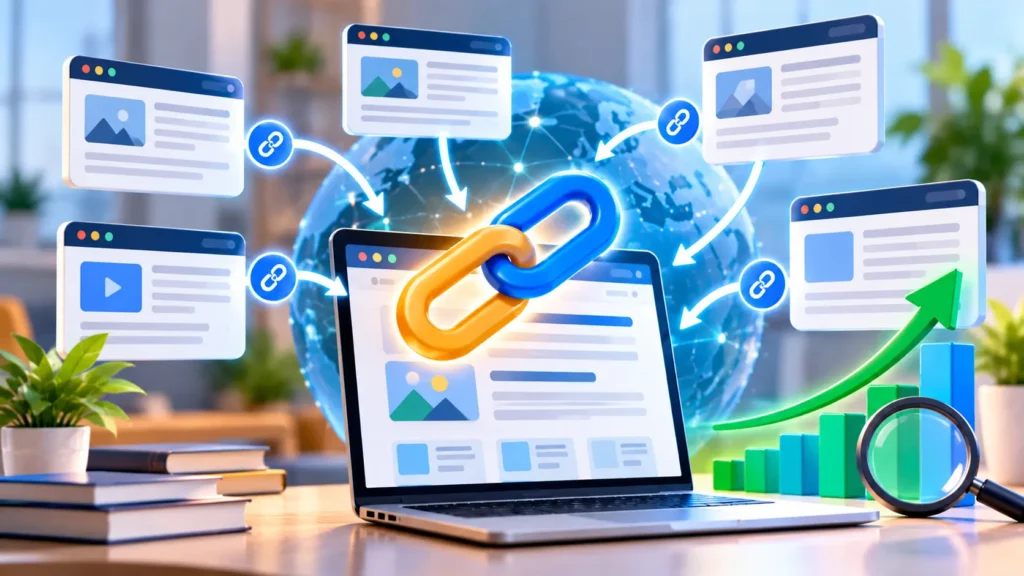
If you are learning SEO, you may have heard people talk about backlinks and link building. Both are important parts of online marketing. But what is link building, and why do website owners spend so much time on it? In simple terms, link building is the process of getting links from other websites to your own website. These links can help people discover your content. They can also help search engines find and understand your web pages. Good link building is not about getting lots of links from random websites. The aim is to earn useful and relevant links from trusted sources. A strong strategy focuses on quality, relevance, and value. It can support your search engine ranking, bring new visitors to your website, and become an important part of your search engine optimization strategy. What Is Link Building? Link building means getting hyperlinks from other websites that point to your website. A hyperlink, usually called a link, lets a person move from one page to another. You click a link, and it takes you to another page or website. Search engines can also follow links. Links help them discover new content and understand how different pages on the internet are connected. Here is a simple example. Imagine that you publish a detailed guide about digital marketing. Another marketing blog finds your guide useful. The writer mentions your guide in an article and links to it. You have now received a backlink. The goal should not be to collect every link you can find. One high-quality link from a useful and relevant website may be more valuable than many unrelated links. Why Is Link Building Important for SEO? Link building for SEO can be useful for several reasons. First, links can help search engines discover pages. Search engine crawlers move across the web by following links from one page to another. Second, relevant links may act as a signal to search engines about relationships between pages and topics. Third, links can drive referral traffic. This happens when someone clicks a link on another website and lands on your site. For example, imagine that a popular marketing blog links to your SEO guide. Some of its readers may click the link because they want more information. These visitors are referral traffic. Links may also support a site’s authority and online visibility when they come from relevant and trustworthy sources. However, backlinks alone do not guarantee that a page will rank highly in the search results. Content quality, relevance, technical performance, and many other factors also matter. How Does Link Building Work? A basic link-building strategy starts with content. You first need something worth linking to. This might be a useful guide, original research, a free tool, statistics, an infographic, or another valuable resource. The next step is finding relevant websites that may be interested in that resource. You can then look for suitable opportunities and contact website owners, writers, or editors. A simple process may look like this: Some backlinks happen naturally. A writer may discover your article through search or social media and decide to reference it without you contacting them. Other links can come from outreach, guest posts, digital PR, resource pages, or broken link building. What Is a Backlink? A backlink is simply a link from another website to your website. Suppose Website A publishes an article that contains a link to Website B. Website B has received a backlink from Website A. Backlinks are also known as inbound links or incoming links. There are different types of links, and they do not all have the same purpose or value. For example, internal links connect pages on the same website. External links point from one website to another. Both can be useful, but backlinks from external websites are usually the main focus when people discuss link building. What Is Anchor Text? Anchor text is the clickable text used in a hyperlink. For example, if an article contains a clickable phrase such as “beginner’s SEO guide,” that phrase is the anchor text. Anchor text can give readers an idea of what they will find after clicking the link. It may also provide search engines with context about the destination page. However, using the same keyword-rich anchor again and again can look unnatural. A healthy link profile can contain different kinds of anchor text, including brand names, page titles, URLs, and natural phrases. The anchor should make sense to the reader and fit naturally into the sentence. What Is Link Equity? Link equity is an SEO term used to describe the value or ranking signals that may pass through a link from one page to another. Not every link passes the same signals. Factors such as relevance, page quality, placement, and link attributes may affect how a link is treated. This is another reason why simply collecting a large number of backlinks is not a strong strategy. Quality and context matter. Common Types of Link Building There are several ways to earn backlinks. The best method depends on your website, industry, audience, and available resources. Guest Posting Guest posting means writing content for another website. You provide an article that is useful to the website’s readers. When appropriate, the article may contain a relevant link to your website. Good guest posting focuses on useful information first. The article should not exist only to place a backlink. Link Insertions A link insertion happens when a relevant link is added to an existing article. For example, a website may already have a guide about digital marketing. If your website has a useful resource that adds extra information, the publisher may choose to reference it. The link should fit the existing content naturally. Broken Link Building Websites change over time. Pages are deleted, URLs change, and some links stop working. Broken link building involves finding these dead links. If you have a relevant resource that could replace the missing page, you can contact the publisher and suggest your content. This can benefit