How to Create Pillar Pages and Topic Clusters: The 2026 Blueprint
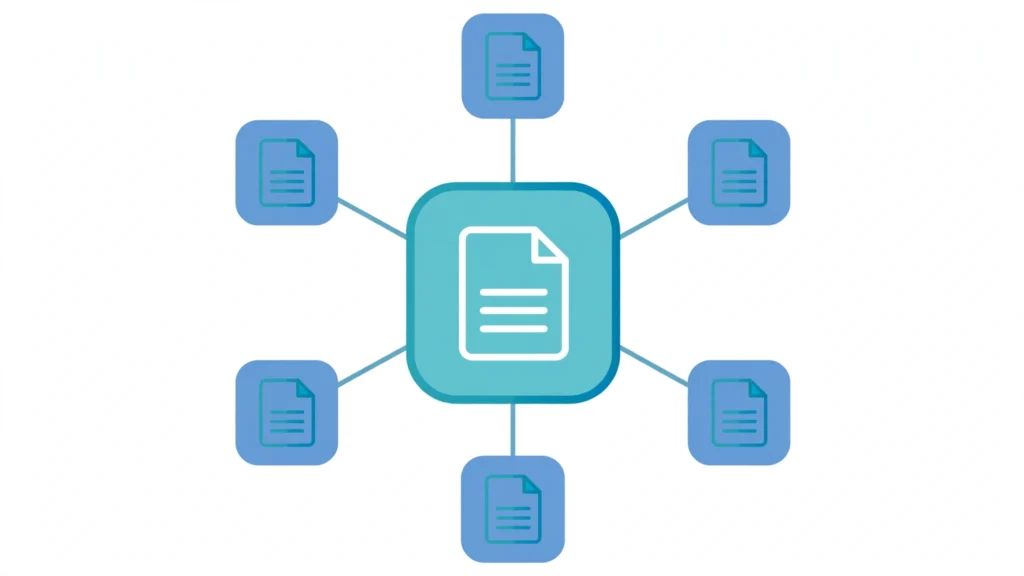
Most websites do not have a content problem. They have an organization problem. Hundreds of disconnected blog posts sit on the same domain, each targeting a keyword in isolation, none of them reinforcing the others. Google sees a pile of pages. It does not see authority. Learning how to create pillar pages and topic clusters matters more in 2026 than ever: search engines now reward sites that demonstrate topical depth, not just keyword relevance. A pillar page is a comprehensive, long-form resource that covers a broad topic at the hub level. Topic clusters are the supporting articles — the spokes — that each go deep on one specific subtopic and link back to the pillar. Together they form a visible web of expertise that helps users explore a subject and helps Google understand that your site owns it. Clustered content has been shown to drive roughly 30% more organic traffic than standalone posts. This guide walks you through the complete process of creating pillar pages and topic clusters: choosing pillar topics, mapping clusters, making the URL architecture decision most guides skip, building the pillar and spokes, wiring the internal links, and keeping the whole thing healthy over time. What Pillar Pages and Topic Clusters Actually Are Before building, get the definitions right, because three confusions derail most projects: Pillar page vs. cluster page: the pillar is the hub — broad, evergreen, and educational. A cluster page (also called a spoke) is one deep dive into a single subtopic. The pillar defines the topic ecosystem; cluster pages expand it. Pillar page vs. landing page: not the same thing. A landing page is conversion-focused and often campaign-specific, with minimal navigation. A pillar page is informational, designed for organic discovery, and optimized for topical coverage. A pillar may include calls to action, but conversion is not its primary job. Topic cluster vs. content silo: silos are rigid, walled-off site sections. Topic clusters are flexible and networked — spokes can link laterally to related spokes, and clusters can overlap when it serves the reader. The reason this structure works comes down to how modern search engines evaluate authority. They look for signals of depth: one topic, many high-quality answers, clear semantic relationships. A cluster sends exactly that signal, while also improving crawl efficiency and reducing bounce by guiding visitors from one answer to the next. Step 1: Choose Pillar Topics That Deserve the Investment Not every topic earns a pillar. Building one is a commitment of dozens of pages, so filter candidates through three lenses: Business relevance. The pillar should map to a service or product area you must rank for to grow revenue. If you are an SEO agency, “SEO” itself, “technical SEO,” and “local SEO” are natural pillars. Pick topics you can legitimately become the expert on. Search demand. The topic needs enough query volume and subtopic breadth to justify 8–20 supporting articles. Use keyword tools, Google autocomplete, and People Also Ask boxes to confirm the subtopic supply before committing. Realistic winnability. Most sites should start with 3–5 pillars — the ones where relevance is highest and competition is weakest — and widen outward as authority compounds. A strong starting move: audit your existing content first. Pages that already have traffic, backlinks, or impressions are often the best pillar candidates, because they already carry some authority and links. Teams that invest in pillar pages and topic clusters early tend to compound their topical authority faster, because every new spoke reinforces the pillar. For the foundational industry reference on this strategy, see Search Engine Land’s complete guide to topic clusters. Step 2: Map Your Clusters Before You Write a Word Do not start by writing. Start by mapping, because retrofitting internal links onto content published in random order is far more work than planning the structure up front. For each pillar, harvest 8–12 spoke topics that cover distinct search intents. Pull from People Also Ask boxes, autocomplete, competitor tables of contents, and your sales team’s FAQ list. Build the map in a spreadsheet with one row per URL and columns for pillar, target keyword, search intent, content format, and the internal links each page must give and receive. This sheet becomes your build checklist and, later, your audit reference. A clean map separates a site that wins with pillar pages and topic clusters from a folder of loosely related posts — and it makes writing faster, because each brief already knows what it links to. Then run the intent deduplication test: if two proposed cluster pages would satisfy the same query, merge them. This is the single highest-leverage quality check in the whole process, and it is where most DIY clusters fail. Which leads directly to a topic nobody covers — the cannibalization audit in step 6. Step 3: Make the URL Architecture Decision Nobody Talks About Here is the gap in nearly every pillar-page guide online: they tell you what to write, but not where to put it. You have two real choices, and each has consequences. Option A: hierarchical URLs. The pillar lives at /topic/ and clusters live underneath, like /topic/subtopic-guide/. This keeps the cluster relationship obvious in the URL itself and keeps breadcrumbs clean. The trade-off: if you later split or merge clusters, URL changes and redirects follow. Option B: flat URLs. Everything lives at the root, like /subtopic-guide/, and the cluster relationship exists only in the linking. This is flexible — spokes can belong to multiple clusters without URL awkwardness — but it leans entirely on internal links to communicate structure to Google. Factor Hierarchical (/topic/spoke/) Flat (/spoke/) Semantic clarity in URL Strong None — linking does the work Restructuring cost Higher (redirects) Lower Cross-cluster spokes Awkward Natural Best for Established, stable topics New or evolving topics The practical rule: use hierarchical URLs for mature topics where the cluster shape is stable, and flat URLs when you are still discovering what the cluster should become. Whichever you choose, apply it consistently — mixed architectures inside one cluster dilute
Featured Snippet Optimization: How to Steal Position Zero in 2026

Featured snippet optimization is the practice of structuring your content so Google selects it for the answer box at the very top of the results — Position Zero. In 2026, with AI Overviews eating screen space and organic listings pushed further down, owning that box is one of the few reliable ways to stay visible. This guide gives you the full playbook: the four snippet formats, a 7-step system, a method for stealing snippets from competitors, and how to measure it all in Search Console. What Is Featured Snippet Optimization? Featured snippet optimization is the SEO discipline of formatting and phrasing your content so Google can extract it directly into the featured snippet box that appears above the standard organic results. A featured snippet is Google’s short, direct answer to a searcher’s question, pulled from one page — and it doesn’t always come from the #1 result. Pages ranking in positions two through ten regularly win the box, which is what makes featured snippet optimization such a powerful lever: it’s one of the only places in SEO where a smaller site can leapfrog a bigger competitor without outranking them everywhere else. At its core, the work is simple. Google needs an answer it can lift cleanly — self-contained, concise, and formatted to match the query’s intent. Your job is to give it exactly that, wrapped in a page with enough depth and authority that Google trusts you as the source. The 4 Featured Snippet Formats (and How to Win Each) Google shows different snippet formats depending on the query type. Your featured snippet optimization starts with identifying which format your target query triggers, then matching it exactly. Paragraph Snippets The most common format, triggered by “what is,” “why,” and “how does” queries. Place a 40–60 word direct answer immediately below an H2 that mirrors the query. Start with the subject, not your brand: “Keyword research is…” beats “We define keyword research as…” Follow with 2–4 supporting sentences, but keep the first block self-contained — Google may show only that. List Snippets (Numbered and Bulleted) Triggered by “how to,” “steps,” “best,” and “types of” queries. Use a proper HTML ordered or unordered list directly under a question-phrased heading. Keep 5–8 items, each under 12 words, front-loading the key action. More than nine items triggers truncation, so stay lean. Table Snippets Triggered by comparisons, pricing, and data queries (“X vs Y,” “average cost of”). Use a real HTML table with a header row, four or fewer columns, and the primary entity in the first column. Tables double as strong candidates for AI Overview citations on comparison content. Video Snippets Triggered by tutorials and how-to queries. Publish a YouTube video with a query-matched title, add VideoObject schema to the embedding page, and use labeled chapters (timestamps in the description) so Google can navigate viewers to the exact moment. What Google Actually Requires Before It Hands You Position Zero Featured snippet optimization only works when the fundamentals are in place. Three requirements are effectively non-negotiable in 2026: You must rank on page one for the query. Google almost never grants a snippet to a page outside the top ten. Snippet work is a layer on top of SEO, not a substitute for it. Your answer must be extractable. Clean semantic HTML, a question-mirroring heading, and the answer directly below it. Buried answers never win. The format must match the intent. If Google currently shows a list for your query and you wrote a paragraph, you’re fighting the algorithm’s learned preference. Match what the SERP wants. Layer authority on top: pages from sites with demonstrated expertise and trustworthy content win ties. Good on-page SEO — internal links, fast load, clean mobile rendering — is part of the trust calculation. The 7-Step Featured Snippet Optimization Playbook Here is the repeatable system our team uses for featured snippet optimization campaigns. Run it query by query. Step 1: Find Snippet-Worthy Queries Look for question-based long-tail keywords in your niche. In Google Search Console, filter your queries with a regex for question words (who, what, where, when, why, how, can, does) and sort by impressions — these are queries where you already have visibility and Google already believes you relevant. Also scan competitors’ pages that own snippets in your space; any snippet they hold for a query you rank for is a target. Google’s own documentation on how featured snippets work confirms there’s no special markup to buy your way in — it’s earned through formatting and relevance, which pairs naturally with the structured-content tactics in our guide to ranking in Google AI Overviews. Step 2: Study the Current Snippet’s Format Search the query in an incognito window. Note the exact format (paragraph, list, table, video), its length, and the angle of the current winner. Your rewrite must match the format and beat the angle. Step 3: Write the Snippet-Bait Answer Block Directly under a heading phrased as the question, write a 40–60 word answer. Declarative sentences, no hedging, no “it depends,” no marketing fluff. This block is what Google lifts — it must make sense with zero surrounding context. Step 4: Use Semantic HTML Real heading tags, real lists, real tables. Avoid divs styled to look like headings or lists built with line breaks — crawlers can’t extract them reliably. Keep tables narrow and lists short. Step 5: Add Depth Below the Answer Google rewards pages that are more than just a snippet. Expand below your answer block with examples, data, and related subtopics. The snippet gets you the box; the depth keeps the ranking that makes the box possible. Step 6: Mirror Question Phrasing in Headings If users search “how do I optimize for featured snippets,” your H2 should say “How Do I Optimize for Featured Snippets?” — not “Our Snippet Strategy.” Match the language of the query, not your internal vocabulary. Step 7: Strengthen Your Authority Signals Earn or keep quality backlinks to the page, keep the content fresh with periodic updates, and link internally
How to Write an SEO Content Brief That Writers Actually Follow

An seo content brief is the single highest-leverage document in a content operation — yet most of them fail before a writer ever types a word. They arrive as a keyword dump, a vague title suggestion, and a word-count target, and the writer is left to guess at search intent, angle, and structure. The result is predictable: drafts that need heavy rewrites, pages that miss intent, and rankings that never arrive. This guide shows you how to write an SEO content brief that writers actually follow, with the exact sections, a real-world example, and the mistakes that send most briefs straight to the trash. What Is an SEO Content Brief? An SEO content brief is a structured document that tells a writer exactly what a page needs to achieve. It bridges the gap between your keyword strategy and the final draft by defining the target keyword, search intent, audience, working title, outline, internal links, proof requirements, and the business goal the content serves. It is not a keyword list. A keyword list tells a writer what terms to sprinkle in. An seo content brief tells them what the searcher is trying to accomplish, what page type will satisfy that intent, and what the article must cover to compete with the pages already ranking. That distinction is what separates content that ranks from content that just exists. Think of the brief as a contract between strategy and writing. The strategist promises to do the research — the SERP read, the intent analysis, the gap finding — so the writer never has to. The writer promises to follow the spec. When both sides hold up their end, the first draft arrives close to publish-ready, review cycles shrink, and every article ships with SEO baked in rather than bolted on. Why Most SEO Content Briefs Get Ignored Before fixing the format, it helps to understand why writers quietly ignore most briefs. If you have ever received a draft that felt like it was written for a completely different assignment, one of these failures is usually the cause. The brief is too thin. A target keyword and a 2,000-word target tell a writer almost nothing. Without intent guidance, the writer guesses — and guesses default to generic. The draft covers everything shallowly instead of the one thing deeply, because nobody told the writer which one thing matters. The brief is too rigid. The opposite extreme is just as bad. A 40-row spreadsheet of keyword density targets, exact-match anchor quotas, and sentence-level instructions turns a skilled writer into a formatter. Good writers stop reading rigid briefs and write whatever feels natural — which is exactly the opposite of what the strategist wanted. The brief is research-free. When the brief contains no SERP analysis, the writer must do the strategist’s job on a writer’s budget. They will not open the top five results, map the subtopics, and identify the gap. They will write from memory and intuition. The page will resemble nothing that ranks. The brief has no point. Many briefs never state what the page should make the reader do — subscribe, book a call, visit a service page, or simply stay and read. A page with no defined job reads like a page with no defined job. Every brief needs a primary action, even if that action is just “keep reading the next section.” The sweet spot sits between these failures: specific about outcomes, flexible about expression. An seo content brief should answer every question a writer would otherwise ask in a meeting, and nothing more. Let us build one. The 9 Sections Every SEO Content Brief Needs A complete seo content brief contains nine sections. Each earns its place by preventing a specific, common failure. You can scale the length of each section to the writer’s experience — a senior writer needs three sentences where a junior needs a paragraph — but skipping sections is what creates rewrite cycles. 1. Target keyword and secondary terms State one primary keyword — the single query this page exists to rank for. Add three to five secondary keywords or natural variants the writer should weave in where they genuinely belong. Avoid density targets; telling a writer to use a term “8-10 times” produces awkward prose that reads badly and performs worse. The primary term belongs in the title, the opening, and at least one heading. Everything else is natural placement. 2. Search intent and page type Read the intent off the SERP, never assume it. Tell the writer what the searcher is trying to do — learn, compare, buy, find a tool — and what page type the SERP demands: a how-to guide, a listicle, a comparison, a product page. This one field prevents the most expensive mistake in content production: writing an article when the SERP wants a tool, or a service page when the SERP wants a guide. For a broader look at how search demand is shifting, read our guide on how to rank in Google AI Overviews, where intent matching matters even more than it does in classic results. 3. Working title Give the writer a working title that includes the primary keyword and stays under roughly 60 characters. Mark it clearly as a starting point, not a mandate — let the writer improve it. A suggested title anchors the piece without handcuffing the writer’s creativity, and it gives the review stage a baseline to judge the final title against. 4. Meta description draft Draft a 150–160 character meta description that includes the keyword and a reason to click. Writers and editors routinely forget meta descriptions until publish day, then write something rushed. A brief that arrives with a strong draft in place saves that scramble and usually produces a better click-through result than a last-minute effort. 5. Audience and angle Define the reader with uncomfortable specificity: job title, company size, expertise level, and what they already know. “SEO managers at mid-size SaaS companies who have published 50+ articles” beats “marketers.”