A strong website needs useful content, but content alone is not enough. Your pages should connect in a clear way. This helps visitors discover related information and makes the whole site easier to explore.
So, what are internal links?
They are hyperlinks that connect one page of a website to another page on the same domain. These connections support website navigation, content discovery, and SEO.
A smart internal linking strategy also gives search engines clues about your site architecture. It shows which pages are related and which content may be important.
For visitors, these links create a smoother journey through your website.
What Is an Internal Link?
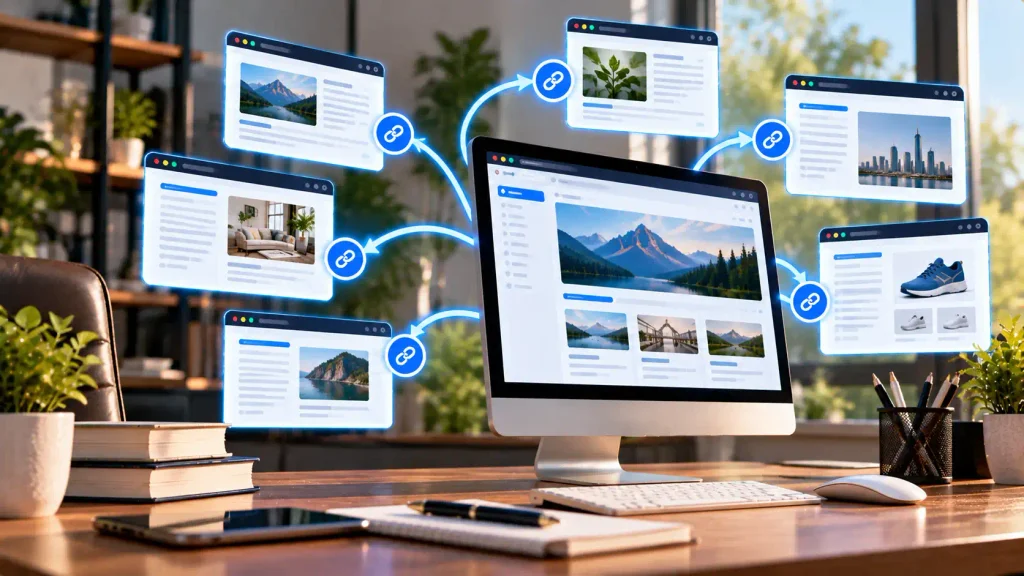
An internal link takes a visitor from one web page to another page on the same website.
Imagine you publish a blog post about SEO. Inside the post, you mention keyword research and link to your keyword research guide.
Because both pages belong to your website, that connection is internal.
You can use these links between:
- Blog posts
- Service pages
- Product pages
- Categories
- Landing pages
- Guides
- Homepage sections
They create useful paths between different pages on your site.
Example of an Internal Link
Suppose your website has an article called “What Is SEO?”
Inside it, you write:
Learn more in our complete keyword research guide.
If the words “keyword research guide” lead to another article on your domain, you have created an internal connection.
Ecommerce stores use the same idea.
For example:
Homepage → Shoes → Running Shoes → Product Page
This path guides shoppers through the store. It improves user navigation and makes products easier to find.
Why Are Internal Links Important for SEO?
Internal link SEO is useful for both visitors and search engines.
A clear linking system can improve content discovery, navigation, and the overall organization of your website.
Help Search Engines Find Pages
Search engine crawlers follow links to discover content.
When a crawler reaches one page, it can follow links to other relevant URLs.
A clear internal link structure can therefore help search engines crawl and index your content.
Pages that have no links pointing to them may be harder to discover.
Explain Content Relationships
Links also show how different topics connect.
For example, a main SEO guide could lead visitors to pages about:
- Keyword research
- Technical SEO
- On-page SEO
- Backlinks
- Local SEO
This creates a logical link structure.
It can make the website easier for users and search engines to understand.
Improve Website Navigation
Visitors often want more information after reading part of an article.
Someone reading about SEO may want to understand backlinks. A relevant link can take that person directly to your backlink guide.
This can keep users engaged and improve their experience.
Support Important Pages
Not every page has the same importance.
You may have an important service, category, guide, or commercial page. A relevant link from a high authority page can provide another path to that content.
Focus on connecting useful and relevant pages rather than adding links everywhere.
What Are HTML Internal Links?
HTML internal links are usually created with the <a> element.
For example:
<a href="/keyword-research/">Learn about keyword research</a>The href contains the destination.
“Learn about keyword research” is the anchor text.
You can also use a complete URL:
<a href="https://example.com/keyword-research/">Keyword research guide</a>If the destination belongs to the same website, it remains an internal connection.
Internal vs External Links
The main difference is the destination.
Links within your website take visitors to another page on your domain.
External links send them to another website.
For example:
Internal:example.com/seo/ → example.com/keyword-research/
External:example.com/seo/ → anotherwebsite.com/guide/
In simple terms, internal connections stay on your domain, while external links point to other domains.
Both internal and external links can be useful.
The first type supports navigation and content organization. External connections can send readers to useful third-party research, tools, or references.
What Is Anchor Text?
Anchor text is the clickable wording used for a hyperlink.
For example:
Read our technical SEO guide for more information.
“Technical SEO guide” is the clickable phrase.
Good descriptive anchor text tells readers what they can expect after clicking.
Compare these examples:
Weak: Click here
Better: Learn how technical SEO works
The second version provides useful context.
Keep your anchor wording natural. Avoid repeating the same keyword every time you create a link.
Different Types of Links Within a Website
Links can appear in many areas of a site. Each type serves a different purpose.
Contextual Links
Contextual links appear naturally within the main body of an article.
For example, a keyword research guide may mention search intent and connect readers to a detailed guide about that subject.
These connections are useful because they appear exactly where readers may need extra information.
Navigation Links
Your main menu usually contains links to important areas such as:
- Home
- About
- Services
- Products
- Blog
- Contact
These connections are an important part of website navigation.
They give visitors a simple way to reach major sections.
Breadcrumb Links
Breadcrumb links show where a page sits within the website hierarchy.
For example:
Home → SEO → Technical SEO → Robots.txt
Breadcrumbs can be especially useful for ecommerce stores and large websites with many categories.
Footer Links
The footer may connect visitors to policies, contact pages, categories, and company information.
Keep footer navigation useful. Adding hundreds of unnecessary URLs can make the structure confusing.
Table of Contents Links
A table of contents helps visitors jump to different sections of a long article.
These links usually lead to sections on the same page.
They make long guides easier to use and support improving user experience.
What Is an Internal Linking Strategy?
An internal linking strategy is a planned system for connecting related content across a website.
Instead of placing random links, you create logical paths between useful pages.
Your plan might include:
- Contextual connections
- Main navigation
- Categories
- Breadcrumbs
- Product links
- Related articles
- Topic clusters
Different websites need different linking strategies.
A small blog may need only a simple structure. A large ecommerce store may need categories, subcategories, product connections, breadcrumbs, and buying guides.
How to Build a Strong Internal Link Structure
A good internal link structure should be simple and useful.
1. Find Your Most Important Pages
Start by deciding which pages matter most.
These may include:
- Main guides
- Service pages
- Product categories
- Landing pages
- Important articles
Make sure visitors can reach these pages from relevant content.
2. Connect Related Topics
Links should make sense in context.
For example, a backlink article could naturally connect to content about anchor text, link building, and guest posting.
This helps readers continue learning.
3. Use Clear Anchor Text
Tell visitors what they will find after clicking.
“Read our keyword research guide” provides more information than “click here.”
The wording should still fit naturally into the sentence.
4. Update Old Content
Older content can provide excellent linking opportunities.
When you publish a new article, review your existing pages. Find natural places to add internal links pointing toward the new resource.
This can make fresh content easier for visitors and crawlers to discover.
5. Avoid Excessive Linking
More links do not automatically mean better SEO.
Every connection should have a reason.
Too many links can distract readers and make an article harder to follow.
Use Topic Clusters
Topic clusters group related articles around a main subject.
For example:
Main SEO Guide
→ Keyword Research
→ Technical SEO
→ On-Page SEO
→ Link Building
→ Local SEO
→ Site Navigation
The main guide can connect to supporting articles. Supporting articles can also point back to the main guide and to other relevant resources.
This creates clear relationships between topics.
A well-planned cluster may also support topic authority by organizing related content in a logical way.
Most importantly, it helps readers explore a subject without having to search your entire website.
Internal Linking for Ecommerce Sites
Ecommerce websites often have hundreds or thousands of URLs.
Good navigation becomes especially important at this scale.
A simple structure may look like this:
Homepage → Category → Subcategory → Product Page
A product page can also connect visitors to:
- Related products
- Product categories
- Buying guides
- Comparison articles
- Helpful blog posts
Suppose you sell running shoes.
A guide about choosing running shoes could direct readers to the relevant category. The category can then lead shoppers to individual products.
This creates a natural journey from informational content to commercial pages.
It is also useful for improving user experience.
Can Internal Linking Increase Organic Traffic?
A good linking system does not guarantee more organic traffic.
However, it can support SEO in several ways.
It can make useful pages easier to discover. It can show relationships between related content. It can also encourage visitors to explore more than one page.
A strong structure should work alongside quality content, keyword research, technical SEO, and a good user experience.
Think of links as pathways. They help people and crawlers move through your content.
How to Find Linking Opportunities
Start by reviewing content you already have.
Look for pages that cover similar subjects.
For example, if you publish content targeting search queries about technical SEO, you may already have guides about robots.txt, crawling, XML sitemaps, and indexing.
These pages can naturally connect to each other.
You can also use Google Search Console to see which pages receive search visibility.
Review those pages and look for places where another useful article would help the reader.
Do not add a connection only because a page performs well. The destination must still be relevant.
Common Linking Mistakes
Even a good website can develop poor linking habits.
Common problems include:
- Using vague anchor text
- Linking to broken URLs
- Adding unrelated links
- Linking mainly to the homepage
- Ignoring older articles
- Creating confusing navigation
- Adding too many links
- Repeating the same anchor phrase
- Leaving important pages isolated
Your linking system should feel natural.
Visitors should be able to move through the site without thinking about its SEO structure.
How to Audit Your Links
Review links across your website from time to time.
Start with important pages. Check whether related content provides useful paths to them.
Look for broken or outdated URLs.
You should also identify pages with few internal links pointing toward them.
Ask yourself:
- Is the destination relevant?
- Is the anchor text clear?
- Does the link help the reader?
- Can important content be reached easily?
- Does the overall site architecture make sense?
Simple improvements can create a cleaner website over time.
Frequently Asked Questions
What Are Internal Links?
They are hyperlinks that connect pages on the same website. They help visitors navigate content and give search engines paths to discover other pages.
What Is an Example of an Internal Link?
If an SEO article links to a keyword research guide on the same domain, that is an internal connection.
What Is the Difference Between Internal and External Links?
Links within a site connect pages on the same domain. External links connect your page to another website. Both have different purposes and can be useful.
What Is an Internal Link in HTML?
You can create one with an HTML anchor element:
<a href="/about/">About Us</a>The href defines the destination. The visible clickable words are the anchor text.
How Many Links Should a Page Have?
There is no fixed number that works for every page. Add links when they genuinely help readers find useful content. Avoid adding unnecessary connections just to increase the number.
Final Thoughts
Internal links create useful paths between related pages on a website.
A thoughtful linking strategy can improve website navigation, create clearer site architecture, and make content easier to discover.
Use contextual links, breadcrumb links, clear anchor text, and topic clusters where they are useful.
Do not focus on repeating keywords or adding the highest possible number of links.
Instead, build a natural link structure around your visitors.
When pages connect logically, the website becomes easier to explore for both users and search engines.
One Response