How to Rank on Google Without Backlinks: 9 Proven Strategies (2026)

Learning how to rank on Google without backlinks sounds like a fantasy if you grew up on old-school SEO advice. For years, the message was simple: no links, no rankings. But Google has changed. Backlinks are no longer among the top three ranking factors, according to Google’s own search team — content quality, search intent match, and user experience now carry more weight. That shift opens a real door for new sites, small businesses, and anyone without a link-building budget. Can every page rank without backlinks? No — and this guide will be honest about where the limits are. But for low-competition keywords, local searches, long-tail questions, and SERP features, you absolutely can win without a single backlink. Below are 9 proven strategies, a method for finding YOUR site’s personal difficulty ceiling, a 90-day roadmap, and the 2026 angles (AI Overviews, SERP features) most guides ignore. This guide breaks down exactly how to rank on Google without backlinks in 2026. Can You Really Rank on Google Without Backlinks in 2026? Yes — with realistic expectations. Here is the honest breakdown: What ranks without backlinks: informational blog posts, long-tail keyword pages, how-to guides, local business pages, niche topics, and question-based content. What usually still needs backlinks: high-volume money keywords, ecommerce category pages, and competitive national terms in finance, law, health, or SaaS. The timeline: expect 3–6 months for content-led strategies on low-competition terms. Competitive terms can take 6–12 months or more. The key insight: when backlinks are missing, Google leans harder on every other signal. Your job is to make those other signals undeniable. If you want to master how to rank on Google without backlinks, start by strengthening every non-link signal. How Google Ranks Pages When Backlinks Are Missing Google evaluates hundreds of signals. Remove backlinks from the equation and these five carry the most weight: Search intent alignment — does your page give the searcher exactly what they wanted, in the format they expected? E-E-A-T (Experience, Expertise, Authoritativeness, Trustworthiness) — real author bios, first-hand experience, and factual accuracy. Topical authority — how completely your site covers the subject, not just the single keyword. On-page SEO — titles, headings, internal links, and meta descriptions still matter enormously. Technical health — Core Web Vitals, mobile usability, crawlability, and structured data. Google’s own SEO starter guide confirms the foundation: helpful, people-first content is what every ranking system is built on. Nail these five and you can outrank linked-up competitors on the right keywords. That five-signal foundation is the entire formula for how to rank on Google without backlinks. 9 Proven Ways to Rank on Google Without Backlinks 1. Find Your Personal Keyword Difficulty Ceiling Every guide says “target low-competition keywords.” Almost none tell you HOW low is low enough for YOUR site. Here is a method that uses your own data instead of a paid tool’s generic score: Open Google Search Console → Performance → filter the last 3 months. Sort queries by position. Find keywords where you already rank in positions 5–20 without trying — those prove Google already trusts you at that difficulty level. Look at the competing pages for those queries. Note their word count, depth, and freshness. That is your current ceiling. Now target new keywords whose top-10 results look weaker than what you already beat — thinner content, older dates, worse intent match. Your ceiling rises as you publish. Re-check every quarter. If you want the full process for finding these keywords in the first place, read our guide on how to do keyword research — then apply this ceiling filter to every candidate. Finding your ceiling is the first real step in how to rank on Google without backlinks. 2. Build Topical Authority With Pillar-and-Cluster Content One great article rarely ranks alone without backlinks. Ten interconnected articles on the same subject can. Topical authority means Google sees your site as the complete resource on a subject — and it rewards complete resources. No single tactic teaches you how to rank on Google without backlinks faster than building topical authority. Pick one core topic (your pillar), e.g. “local SEO.” Write 6–10 supporting articles on subtopics (Google Business Profile, reviews, citations, NAP consistency). Link every supporting article to the pillar and to each other where relevant. Publish consistently — one strong post per week beats five posts in one burst. This is the single highest-leverage no-backlink strategy. A site that covers a niche deeply will outrank a stronger-domain site that published one shallow post on the topic. Depth beats breadth when you learn how to rank on Google without backlinks. 3. Steal SERP Features: Featured Snippets, PAA, and Image Packs Here is what most “no backlinks” guides miss: you do not always need position #1. Featured snippets, People Also Ask boxes, and image packs sit ABOVE the organic results — and they are far easier to win without backlinks because Google picks them for answer quality, not link authority. That makes SERP features a shortcut for how to rank on Google without backlinks. Featured snippets: answer the target question in 40–60 words right after an H2/H3 that mirrors the query. Use definitions, steps, and tables. People Also Ask: add an FAQ section answering 4–6 related questions (like the one at the bottom of this article). Each answer should be self-contained. Image packs: original images with descriptive file names and keyword-rich alt text can rank in image results with zero links. For the full playbook, see our featured snippet optimization guide and our People Also Ask optimization guide. 4. Get Cited in Google AI Overviews In 2026, AI Overviews answer a huge share of informational queries directly on the results page. The sites they cite get visibility and clicks without needing to outrank anyone — and citation selection favors clear, structured, factual content over backlink profiles. Sites that understand how to rank on Google without backlinks treat AI Overviews as prime real estate. Write definitive, quotable statements: one clear sentence that directly answers the query. Structure with descriptive
How to Create Pillar Pages and Topic Clusters: The 2026 Blueprint
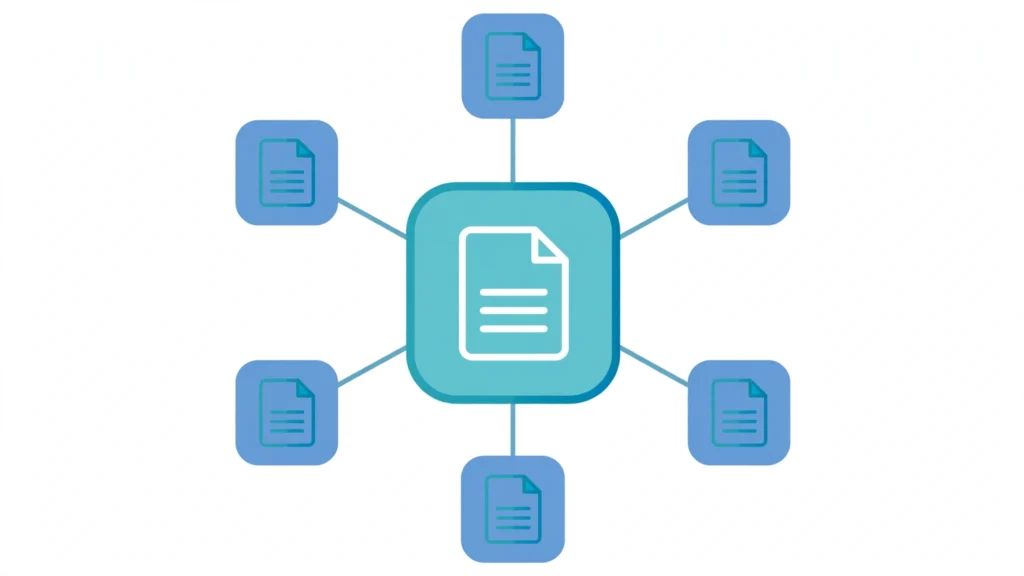
Most websites do not have a content problem. They have an organization problem. Hundreds of disconnected blog posts sit on the same domain, each targeting a keyword in isolation, none of them reinforcing the others. Google sees a pile of pages. It does not see authority. Learning how to create pillar pages and topic clusters matters more in 2026 than ever: search engines now reward sites that demonstrate topical depth, not just keyword relevance. A pillar page is a comprehensive, long-form resource that covers a broad topic at the hub level. Topic clusters are the supporting articles — the spokes — that each go deep on one specific subtopic and link back to the pillar. Together they form a visible web of expertise that helps users explore a subject and helps Google understand that your site owns it. Clustered content has been shown to drive roughly 30% more organic traffic than standalone posts. This guide walks you through the complete process of creating pillar pages and topic clusters: choosing pillar topics, mapping clusters, making the URL architecture decision most guides skip, building the pillar and spokes, wiring the internal links, and keeping the whole thing healthy over time. What Pillar Pages and Topic Clusters Actually Are Before building, get the definitions right, because three confusions derail most projects: Pillar page vs. cluster page: the pillar is the hub — broad, evergreen, and educational. A cluster page (also called a spoke) is one deep dive into a single subtopic. The pillar defines the topic ecosystem; cluster pages expand it. Pillar page vs. landing page: not the same thing. A landing page is conversion-focused and often campaign-specific, with minimal navigation. A pillar page is informational, designed for organic discovery, and optimized for topical coverage. A pillar may include calls to action, but conversion is not its primary job. Topic cluster vs. content silo: silos are rigid, walled-off site sections. Topic clusters are flexible and networked — spokes can link laterally to related spokes, and clusters can overlap when it serves the reader. The reason this structure works comes down to how modern search engines evaluate authority. They look for signals of depth: one topic, many high-quality answers, clear semantic relationships. A cluster sends exactly that signal, while also improving crawl efficiency and reducing bounce by guiding visitors from one answer to the next. Step 1: Choose Pillar Topics That Deserve the Investment Not every topic earns a pillar. Building one is a commitment of dozens of pages, so filter candidates through three lenses: Business relevance. The pillar should map to a service or product area you must rank for to grow revenue. If you are an SEO agency, “SEO” itself, “technical SEO,” and “local SEO” are natural pillars. Pick topics you can legitimately become the expert on. Search demand. The topic needs enough query volume and subtopic breadth to justify 8–20 supporting articles. Use keyword tools, Google autocomplete, and People Also Ask boxes to confirm the subtopic supply before committing. Realistic winnability. Most sites should start with 3–5 pillars — the ones where relevance is highest and competition is weakest — and widen outward as authority compounds. A strong starting move: audit your existing content first. Pages that already have traffic, backlinks, or impressions are often the best pillar candidates, because they already carry some authority and links. Teams that invest in pillar pages and topic clusters early tend to compound their topical authority faster, because every new spoke reinforces the pillar. For the foundational industry reference on this strategy, see Search Engine Land’s complete guide to topic clusters. Step 2: Map Your Clusters Before You Write a Word Do not start by writing. Start by mapping, because retrofitting internal links onto content published in random order is far more work than planning the structure up front. For each pillar, harvest 8–12 spoke topics that cover distinct search intents. Pull from People Also Ask boxes, autocomplete, competitor tables of contents, and your sales team’s FAQ list. Build the map in a spreadsheet with one row per URL and columns for pillar, target keyword, search intent, content format, and the internal links each page must give and receive. This sheet becomes your build checklist and, later, your audit reference. A clean map separates a site that wins with pillar pages and topic clusters from a folder of loosely related posts — and it makes writing faster, because each brief already knows what it links to. Then run the intent deduplication test: if two proposed cluster pages would satisfy the same query, merge them. This is the single highest-leverage quality check in the whole process, and it is where most DIY clusters fail. Which leads directly to a topic nobody covers — the cannibalization audit in step 6. Step 3: Make the URL Architecture Decision Nobody Talks About Here is the gap in nearly every pillar-page guide online: they tell you what to write, but not where to put it. You have two real choices, and each has consequences. Option A: hierarchical URLs. The pillar lives at /topic/ and clusters live underneath, like /topic/subtopic-guide/. This keeps the cluster relationship obvious in the URL itself and keeps breadcrumbs clean. The trade-off: if you later split or merge clusters, URL changes and redirects follow. Option B: flat URLs. Everything lives at the root, like /subtopic-guide/, and the cluster relationship exists only in the linking. This is flexible — spokes can belong to multiple clusters without URL awkwardness — but it leans entirely on internal links to communicate structure to Google. Factor Hierarchical (/topic/spoke/) Flat (/spoke/) Semantic clarity in URL Strong None — linking does the work Restructuring cost Higher (redirects) Lower Cross-cluster spokes Awkward Natural Best for Established, stable topics New or evolving topics The practical rule: use hierarchical URLs for mature topics where the cluster shape is stable, and flat URLs when you are still discovering what the cluster should become. Whichever you choose, apply it consistently — mixed architectures inside one cluster dilute
How to Build Topical Authority: Become the Go-To Source in Your Niche

Google increasingly rewards sites that demonstrate deep, connected coverage of a subject — the go-to source for a topic, not a random page that matches a keyword. This guide shows you how to build topical authority step by step: the honest definition, a 7-step system, a self-audit score, and how to measure it. No filler, no fake scores. What Topical Authority Really Means (Start With the Honest Version) Topical authority is the degree to which your site is recognized — by readers, peers, and search systems — as a consistently valuable, trustworthy source on a defined subject. The signs: deep coverage, original contributions, consistent focus, clear page relationships, positive reputation, and evidence people return to or cite your work. Here is the honesty part. Anyone teaching how to build topical authority should start with this: Google has never published a universal “topical authority score” the way Moz publishes Domain Authority. Google has documented a “topic authority” system for newsy queries — surfacing expert sources using signals like notability and original reporting — but that does not prove publishing 25 cluster pages triggers an identical site-wide mechanism for every blog. So treat “topical authority” as a practitioner framework, not a confirmed single ranking factor — per Google’s ranking-systems guidance, its systems work mainly at page level with some site-wide signals. The smart move: build topic depth as a consequence of serving your audience well, not as theater for an imagined score. Why Topical Depth Now Beats Raw Domain Authority The March 2026 core update changed the math for smaller sites: the winners shared one trait — narrow, deep topical coverage beat bloated domains stretching to rank for everything. The cautionary tale is just as clear. Generalist publishers that coasted on domain authority to rank for off-topic content got cut down hard — the widely reported traffic collapse of a major marketing publisher after years of “publish anything that ranks” is the textbook example. For a focused business, this is the best news in a decade. You no longer need to out-link a 500,000-page competitor — you need to know more about your specific topic and prove it. A regional plumber can now outrank a national media giant on a niche query because the plumber has the depth. That is the environment this playbook is built for. For a focused business, learning how to build topical authority is now the highest-leverage SEO investment available. How to Build Topical Authority: The 7-Step System Every site that has cracked how to build topical authority in 2026 uses some version of the same architecture. Here is the complete system, in the order that compounds. Step 1: Draw Your Topic Boundary The first decision when learning how to build topical authority is also the hardest: choosing what not to cover. A defensible topic sits where three circles overlap — audience demand, credible contribution, and strategic relevance. Write a one-sentence boundary statement: “We cover [subject] for [audience] so they can [outcome]. We do not cover [adjacent subjects] unless they change that outcome.” Topic discipline is the foundation everything else rests on. Step 2: Map Reader Jobs, Not Keyword Permutations List the decisions people make inside your topic in a spreadsheet, organized by job family: Understand, Choose, Plan, Implement, Troubleshoot, Measure, Maintain. Pull questions from People Also Ask, autocomplete, forums, and your inbox — customers ask things no tool shows you. Each distinct job becomes a candidate page; smaller questions become sections. This six-month editorial calendar is the engine of how to build topical authority. Step 3: Give Every URL Exactly One Job Before writing anything, assign each reader job to one URL and write a one-sentence responsibility for it: “This page is the site’s best answer for [reader] who needs to [job]; it does not own [neighboring job].” If two proposed pages cannot be distinguished without mentioning their target keywords, they are the same page. Merge them now. This prevents topical cannibalization: two of your own pages competing for one query split your relevance signals, so neither ranks as well as one complete page would. One job, one URL, no exceptions. Cannibalization is the most common reason teams stall when learning how to build topical authority — the repair playbook is covered later. Step 4: Publish the Pillar First, Then Clusters in Demand Order Your pillar page is the backbone of how to build topical authority that lasts: a 2,500–3,500-word resource covering the core topic broadly, answering the main question in the first hundred words, and linking to every supporting page. It should rank for the head term, and it is your most linkable asset. Then publish supporting pages in demand order — highest-demand subtopics first, so the cluster earns traffic while it grows. Each cluster page covers one subtopic thoroughly (1,200–2,000 words), links back to the pillar, and sideways to its closest siblings. A subtopic that cannot support 800 honest words is a section, not a page. Thin filler weakens the cluster. Step 5: Wire Internal Links Like Architecture, Not Decoration Internal links are the wiring diagram for how to build topical authority — how you tell Google “these pages are one body of expertise.” Most sites fail two ways: linking to the homepage instead of related posts, and dropping context-free links in the conclusion. The rules: every cluster page links to its pillar at least twice, with descriptive anchor text containing the pillar’s primary keyword. Place links inside the section that earned the citation — context around the link is what passes relevance. The pillar links down to every cluster; siblings link where one supplies the next decision. Sketch the map from memory before publishing. If you cannot sketch it, your plan for how to build topical authority is not finished yet. Step 6: Earn Depth With Information Gain A complete cluster is not the one with the most URLs. It is the one where every page contributes something beyond a competent summary: first-hand observation, original data, a worked example, a decision framework, a